
When attackers break into a server, one of the first things they do is delete the backups. If your backups live on the same server, or the server holds the keys to delete them, you only have backups until the day you need them.
After moving our sites off cPanel, we built backups that the server itself cannot delete. Every night, our cloud server sends an encrypted backup to a mini PC and a USB disk at home. It can add new snapshots. It can’t remove or change old ones.
- Hardware: a mini PC and a 1 TB USB disk, roughly €1–2 a month of electricity.
- Network: nothing exposed to the internet. Everything runs over Tailscale.
- Software: restic and its rest-server in append-only mode.
- Proof: we tried deleting a backup from the server. It was refused.
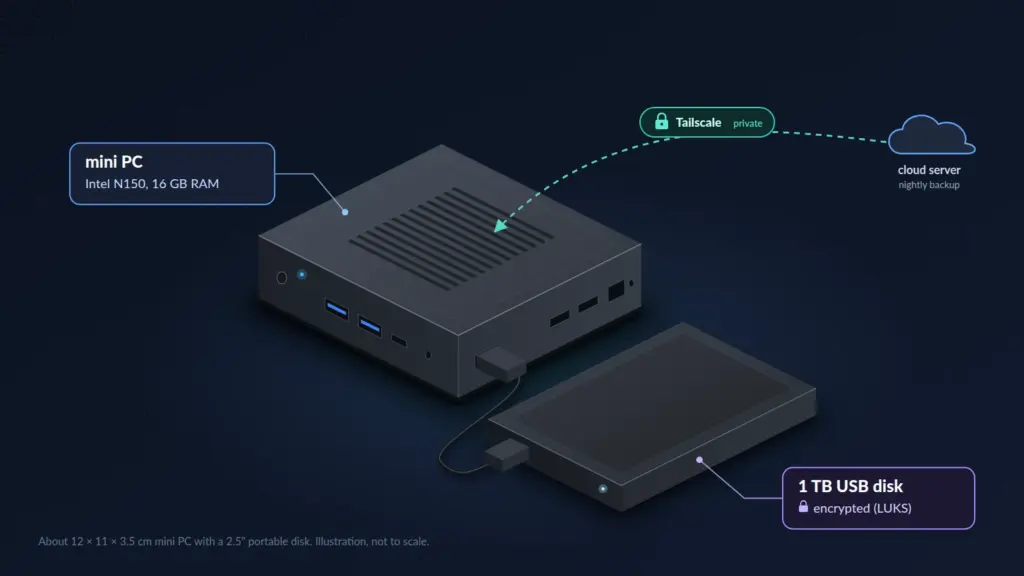
The hardware
The mini PC is a small Intel N150 box (review): 4 cores, 16 GB of RAM, a 512 GB SSD, about 12 × 11 cm. The N150 is rated at 6 W, so running it 24/7 costs very little. It already ran our home monitoring, so backups were a new job for an existing machine.
The disk is a 1 TB portable USB hard disk. We checked whether the mini PC could take an internal NVMe drive. It can’t: its only M.2 slot is SATA, and its PCIe lanes go to Wi-Fi and Ethernet. A USB disk was the simplest way to give backups their own physical drive.
Why a separate disk at all? If backups sit on the same SSD as the operating system, one dead SSD takes both.
Measured on the real disk:
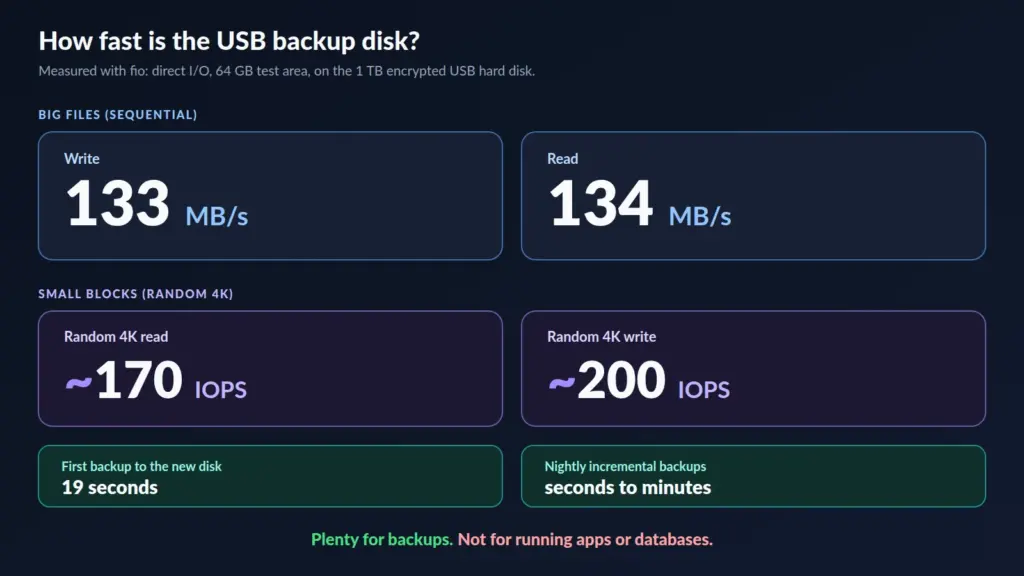
133 MB/s is slow for running apps, and more than enough for backups. Reading back all 25 GB on the disk takes about three minutes.
How it works
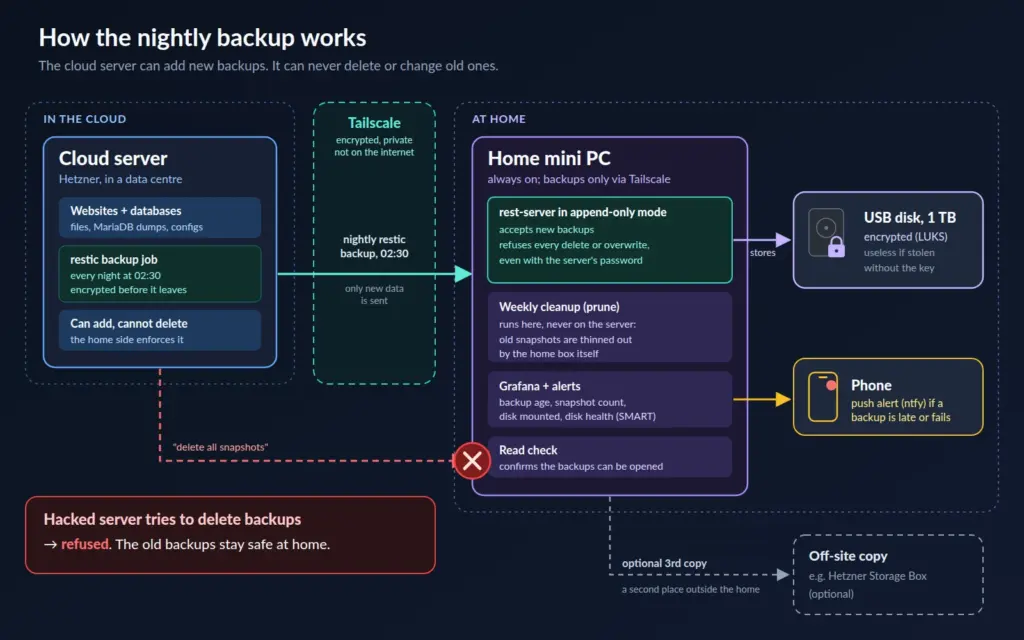
- Every night around 02:30, the cloud server dumps its databases and runs restic, which encrypts and deduplicates the data and sends only what changed. After the first run, a nightly backup takes seconds.
- The backup travels over Tailscale, a private encrypted network between our machines. The backup service listens only on that private network; it isn’t reachable from the internet.
- On the mini PC, rest-server receives the data in append-only mode: the cloud server can add snapshots but can’t delete or overwrite anything.
- The data lands on the USB disk, encrypted with LUKS (cryptsetup). If someone walks off with the disk, they get noise.
- Old snapshots are pruned on the mini PC itself, once a week. Deletion only ever happens at home, never from the server being backed up.
The test that matters
A backup design is only as good as the attack you’ve tried. So we pretended the server was hacked and tried to delete a snapshot from it:
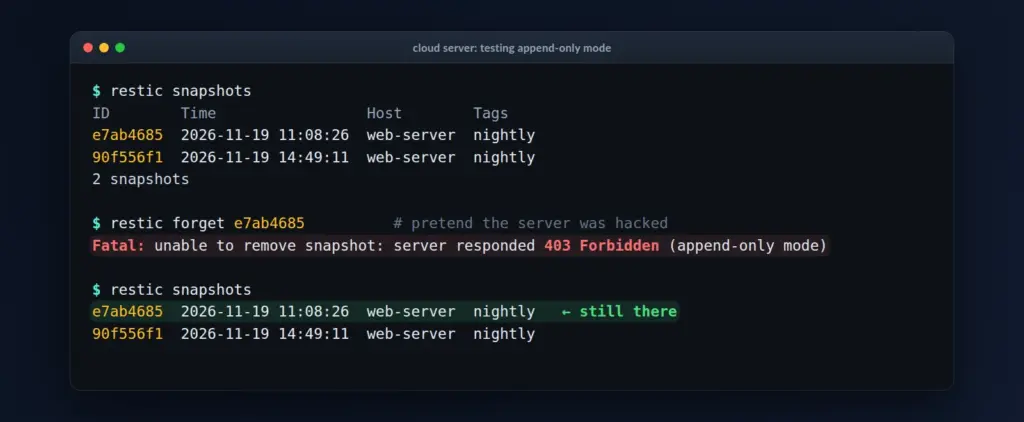
Refused, and the snapshot is still there. Even with full control of the cloud server, an attacker can’t destroy the history. The worst they can do is stop new backups or fill the disk with junk, and our alerts catch both.
Watching it
The mini PC already runs Grafana, so the backup disk got its own panels: mounted or not, space used, health, and the age of the last backup.
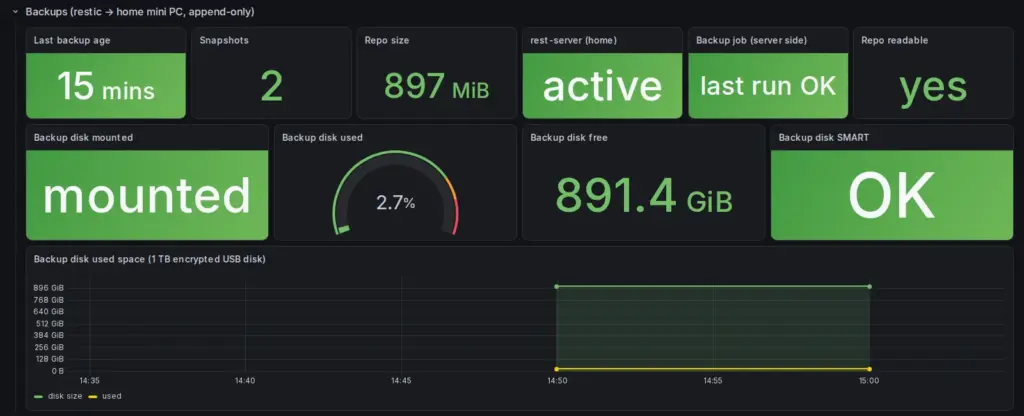
Alerts go to a phone through ntfy if:
- the disk is unplugged or not mounted for 15 minutes,
- it’s more than 85% full,
- its health check fails,
- the newest backup is older than 26 hours.
If the disk is missing, the backup service refuses to start instead of silently writing to the mini PC’s own SSD. The mini PC still boots normally, because the disk is marked optional.
The 3-2-1 rule
The classic 3-2-1 backup rule: 3 copies of your data, on 2 different media, 1 of them off-site.
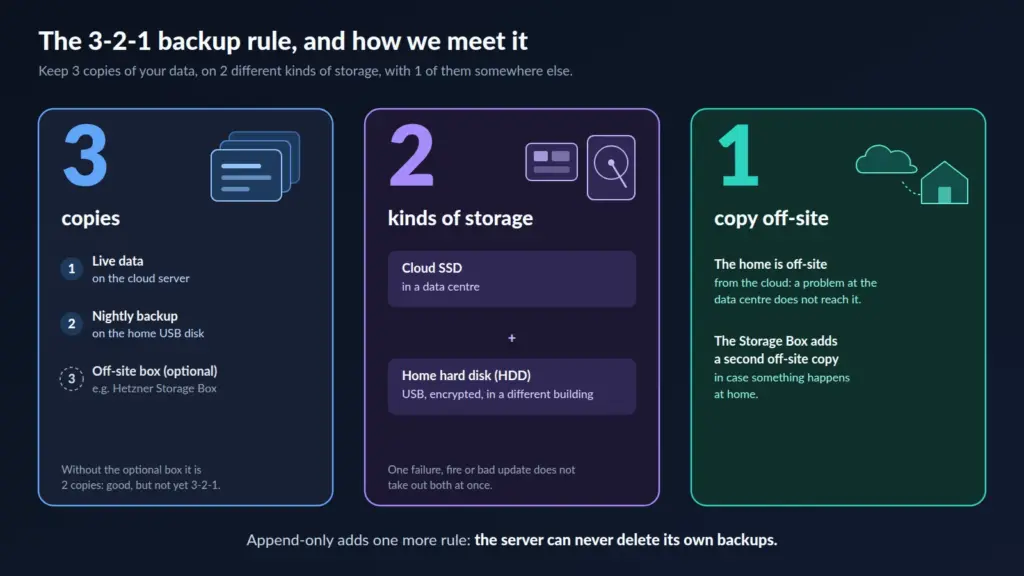
The live server is copy one. The home disk is copy two, on different hardware and in a different place. For the third, an off-site copy such as a Hetzner Storage Box closes the last gap: a fire or burglary at home.
What it costs
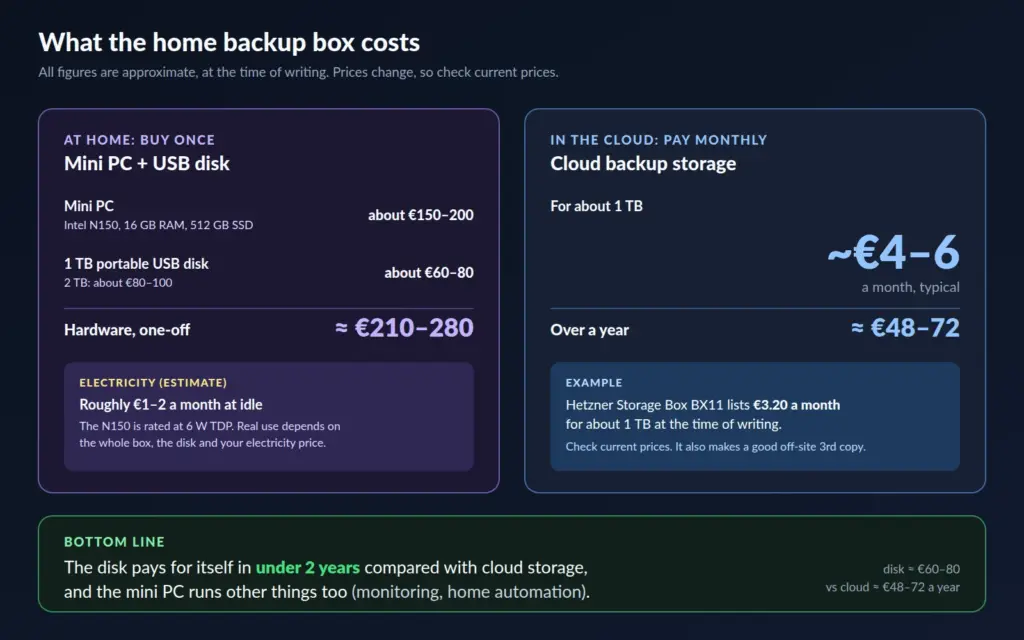
The honest maths: the disk alone pays for itself in under two years compared with 1 TB of cloud backup storage. The whole kit takes longer, but the mini PC was already running our monitoring and home automation, so the backup job came almost free.
What went wrong
Two honest mistakes:
- The “SSD” was a hard disk. The drive we plugged in turned out to be a spinning disk with a Mac filesystem on it. The agent caught both before erasing anything, and the backup plan didn’t need an SSD anyway.
- The first speed test lied. Our disk-testing tool, fio, treats
:as a separator in file names, and the disk’s ID ended in-0:0. Instead of testing the disk, it wrote about 30 GB into a file in RAM and reported a magical 823 MB/s. The numbers were physically impossible for a 5 Gb/s USB link, which is how we spotted it. The file was deleted within minutes and nothing crashed.
If a benchmark looks too good, check that it measured what you think it measured.
Build your own
The core is three small pieces. Replace the placeholders with your own values.
On the home machine: rest-server, listening only on its Tailscale address, append-only, one private repository per client:
rest-server --path /srv/backups/restic \
  --listen <tailscale-ip>:8000 \
  --append-only --private-repos \
  --htpasswd-file /etc/rest-server/users.htpasswd
On the server: a nightly restic backup to that endpoint:
export RESTIC_REPOSITORY=rest:http://<user>:<password>@<tailscale-ip>:8000/<user>/
export RESTIC_PASSWORD_FILE=/etc/restic/password
restic backup /srv /etc /var/backups/db
On the home machine: an encrypted disk that never blocks boot, and a backup service that won’t run without it:
# /etc/crypttab
backups  UUID=<luks-uuid>  /etc/luks/backups.key  luks,nofail

# drop-in for the rest-server service
[Unit]
RequiresMountsFor=/srv/backups
Then prune on the home side, on a schedule, against the local repository path, never through rest-server:
restic forget --keep-daily 14 --keep-weekly 8 --keep-monthly 12 --pruneBefore you trust it: restore a file, and try deleting a snapshot from the server. If the delete succeeds, it isn’t append-only.
Want a setup like this for your servers? Get in touch. We design backups and monitoring that hold up when things go wrong.