
Our sites ran on a cPanel server for years. Nobody looked at it unless something broke.
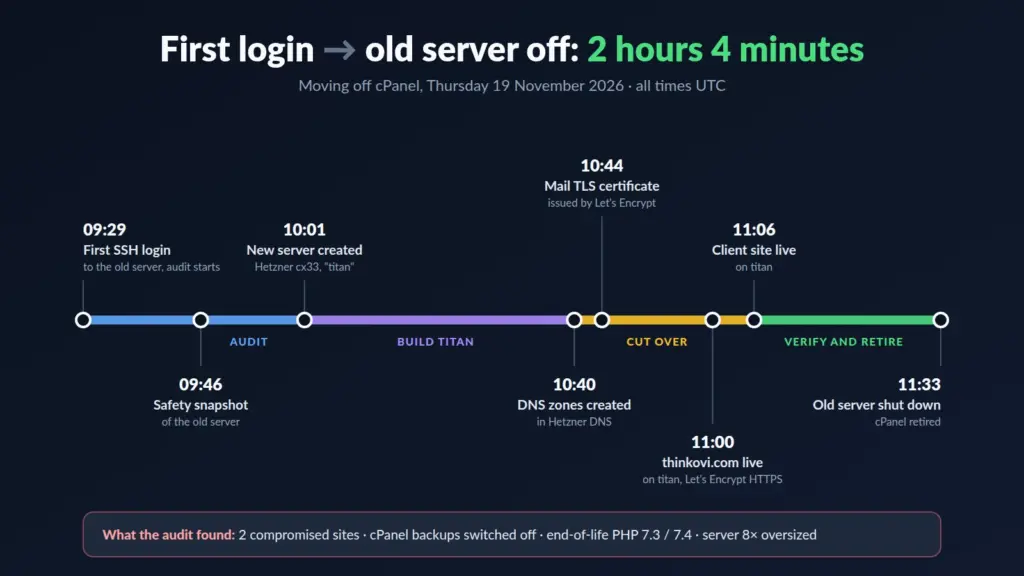
This week we looked. 2 hours and 4 minutes after the first SSH login, the old server was powered off and everything ran on a new one.
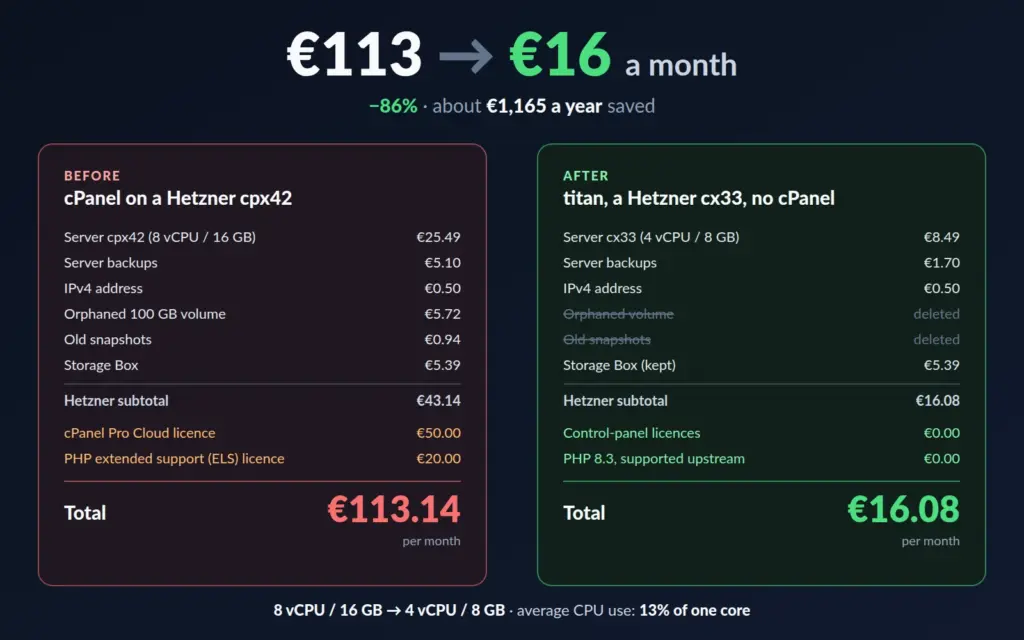
- Cost: €113 → €16 a month.
- Security: 400+ hidden malware files found and quarantined.
- Mail: fixed after 5 weeks of silent bounces.
- Operations: monitoring, alerts, append-only backups and a daily AI health check.
An AI agent (Claude Code) did most of the sysadmin work. I made the decisions.
What we found
The first step was read-only: log in and report what the server actually does.
- 8 vCPU / 16 GB for a load of 0.1. Average CPU over 30 days: 13% of one core.
- 9 accounts, 3 active. The rest were suspended leftovers.
- PHP 7.3 and 7.4, end-of-life, kept alive by a paid add-on.
- cPanel backups switched off. Only the provider’s disk backups were on.
- Broken DNS zones, pointing at nameservers that don’t exist.
- Mail bouncing for 5 weeks.
info@pointed at a deleted Google Workspace account: 77 bounces, nobody noticed. - Two hacked sites. One had 400+ PHP backdoors hidden as
.icoand.pngfiles, some from 2018; the malware scanner flagged 50. The other ran a pirated theme with the WP-VCD backdoor and an SQL injection on every page; the scanner called it clean.
Nothing was deleted. Malware went into a locked quarantine with a checksum manifest.
What it cost
| Per month | Before | After |
|---|---|---|
| Server | €25.49 (8 vCPU / 16 GB) | €8.49 (4 vCPU / 8 GB) |
| Server backups | €5.10 | €1.70 |
| IPv4 | €0.50 | €0.50 |
| Unused 100 GB disk (since 2020) | €5.72 | – |
| Old snapshots | €0.94 | – |
| Storage Box | €5.39 | €5.39 |
| cPanel Pro Cloud licence | €50.00 | – |
| PHP extended support | €20.00 | – |
| Total | €113.14 | €16.08 |
€97 a month saved (−86%), about €1,165 a year. The licences alone cost more than all the hosting.
The new setup
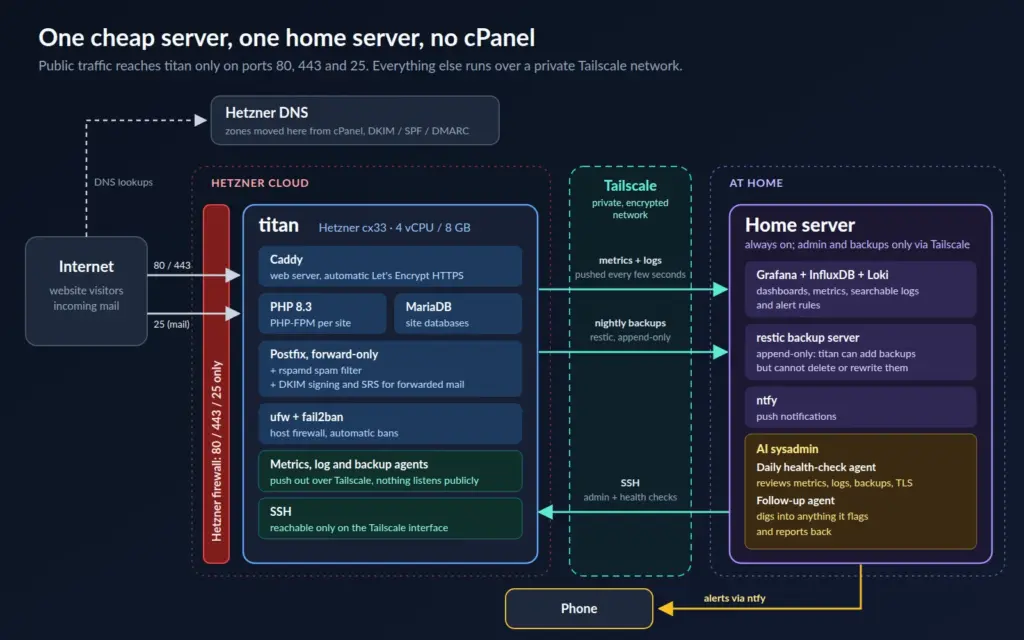
No control panel. A small server, configured from scripts in git.
- Hetzner cx33.
- Caddy with automatic Let’s Encrypt for every hostname.
- PHP 8.3, one locked-down pool per site. Code is read-only to PHP.
- Forward-only mail: spam rejected on arrival (rspamd), DKIM signing, SRS so forwards pass SPF. No mailboxes to break into.
- Hetzner DNS, managed through its API.
- Public ports: web and mail only. SSH is reachable only over Tailscale, our private network.
The hacked WordPress site was not migrated. Its replacement uses fresh core, the official parent theme and our own reviewed child theme, with no plugins. The client site became plain static HTML: no PHP, no database, no login.
How the agent worked
- Parallel helpers. One migrated WordPress while others prepared DNS, rebuilt the client site and set up monitoring. Each had a written brief with limits.
- Read first. Every phase started with a report, not a change.
- Safety nets first. A server snapshot and verified backups of all 9 accounts before touching anything.
- Humans approve the irreversible. Deleting servers, cancelling licences and changing nameservers were my calls.
- Guardrails worked. Claude Code’s permission system blocked the agent several times, e.g. editing live DNS without approval, or loosening a security rule further than needed. Each was a decision I wanted to make myself.
Running it agentically
Grafana
The server pushes metrics and logs (InfluxDB and Loki) over Tailscale to Grafana on a home server: load, traffic per site, status codes, mail, logins, firewall blocks, backup age, certificate expiry and searchable logs.
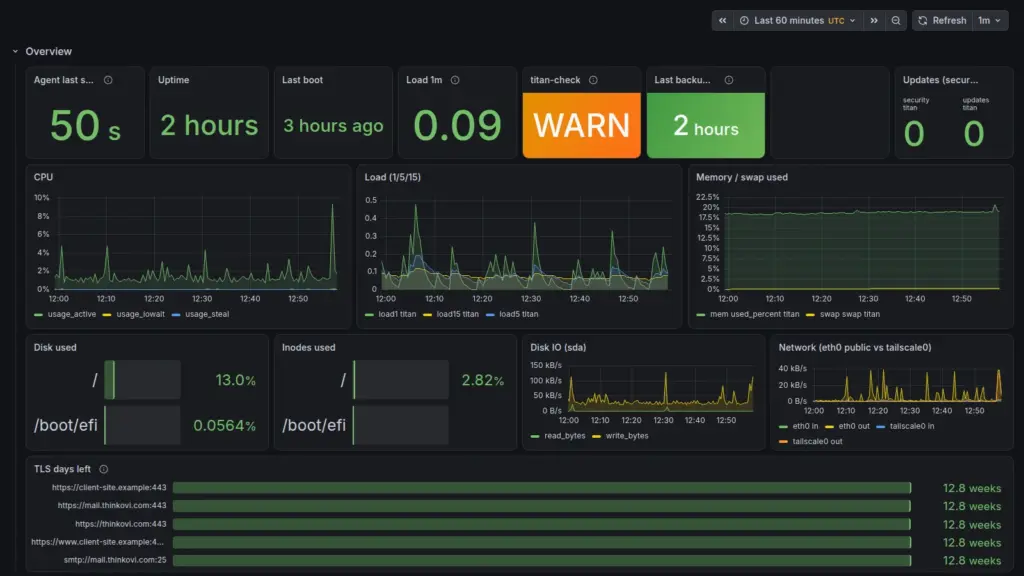
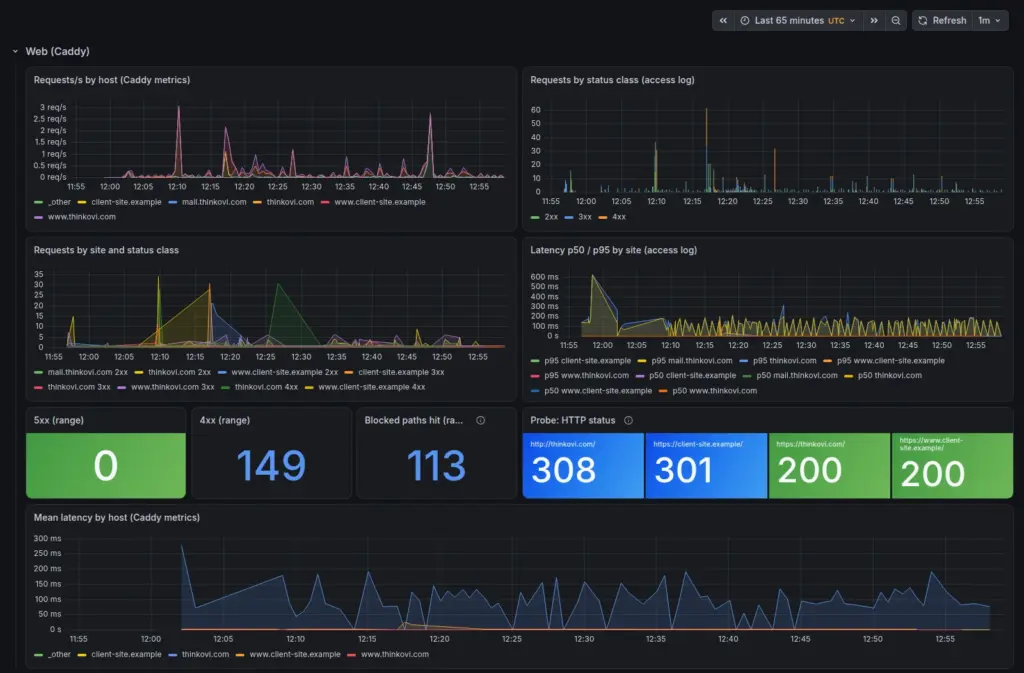
Alerts go to my phone via ntfy: server down, site failing, disk filling, backup older than 26 hours, certificate expiring.
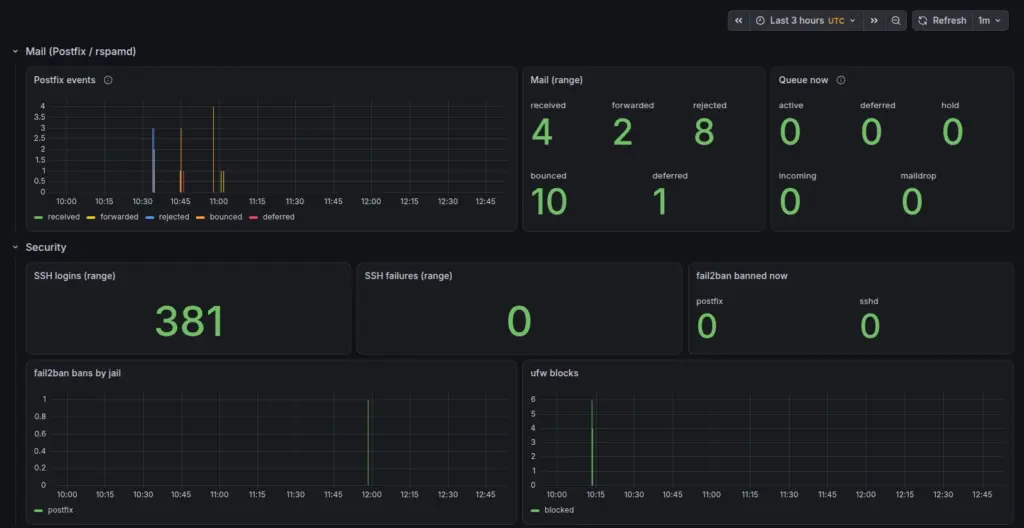
A daily AI health check
Every morning a read-only script collects facts (services, updates, logins, open ports, file changes, malware patterns, backups) and compares them with an approved baseline. A model reviews the result and writes a short report.
- The collector never changes anything.
- The model can raise a severity, never lower it. If it fails, the raw report still goes out.
- On WARN or ALERT days, a second agent investigates, read-only, and writes up what it found.
Backups a hacked server can’t delete
Nightly restic backups go to the home server through an append-only endpoint. The server can add snapshots, not delete them. We tested it: the delete was refused. Pruning happens on the home server only.
What went wrong
The site was live everywhere except on my own laptop. My router’s DNS provider and then my Mac had cached the old server’s address, and we had just switched that server off.
Lesson: lower DNS TTLs a day before a migration, and keep the old server up until caches expire. We skipped both to take a backdoored site offline sooner.
If you still run cPanel
- Audit it. What does it host, and when did you last test a restore?
- Test your mail. Send to every address you publish.
- Don’t trust “scanner: clean”. Look for PHP inside images and hidden files in uploads.
- Right-size it. Ours needed an eighth of what we paid for.
- Keep configs in git, so the next rebuild starts from scripts, not memory.
Running a server like ours? Get in touch. We help teams move off legacy hosting with agent-assisted migrations.